Circular Factory Platform: Tech Stack Guide

The Circular Factory platform is a web-based tool designed to help plan and execute workshop projects more smoothly. It’s built for both desktop and tablet use, aiming to make it easier for everyone involved to stay on the same page.
Main Features
- Part Library Interface: Offers an overview of the parts in each project, showing their details and current status to help track progress.
- Project Scheduling: Provides detailed schedules that outline tasks, machine usage, and timelines, ensuring that everything is on track.
- Parametric Design Integration: Works with Rhinoceros and Grasshopper3D to help bridge the gap between design and manufacturing.
- Fabrication Feedback Loops: Real-time updates from the shop floor allow the team to make adjustments based on what’s happening in production, helping to refine designs and manage resources better.
- Human-Machine Interface (HMI): A simple interface for fabricators to get the instructions they need, track task progress, and report any issues that come up.
Documentation Usage
If you are a user, follow this Index:
- Logging In and Navigating the Interface
- Introduction to Part Library
- Viewing and Filtering Parts
- Part Status and Metadata Overview
- Status
- Fabrication schedules
- Bill of Materials
- Introduction to Scheduling
- Gantt Chart Overview for Scheduling
- Viewing and Filtering Parts
- Rescheduling
- Example Use Cases:
- Managing Delays
- Managing Errors
- Instructions Overview
- Real-time logging
- Reporting Errors
- Parts Bill of Materials Overview
- Machine Maintenance Overview
- Storage Overview
For development documentation, follow this Index:
- Technical introduction
- Firebase Database
- Google Cloud Run
- Scheduling
- GraphQL
- AWS
- S3 Storage
- CloudFront
- Database Structure
- Buildings
- Parts
- Machines
- Processes
- Users
- Backups
- GraphQL Interface
- Queries
- Mutations
- Deployment
- Scheduling Algorithm
- Variables
- Constraints
- Communication
- Deployment
- Frontend
- Structure
- Storage
- Deployment
- Grasshopper
- Components Overview
- Communication Structure
- Example Project: Duna
- Example Project: Cabins
- Robot
- Grasshopper Programming
- Robot Controllers
- Tools
- CNC
- Grasshopper Programming
- Tools
Software Stack
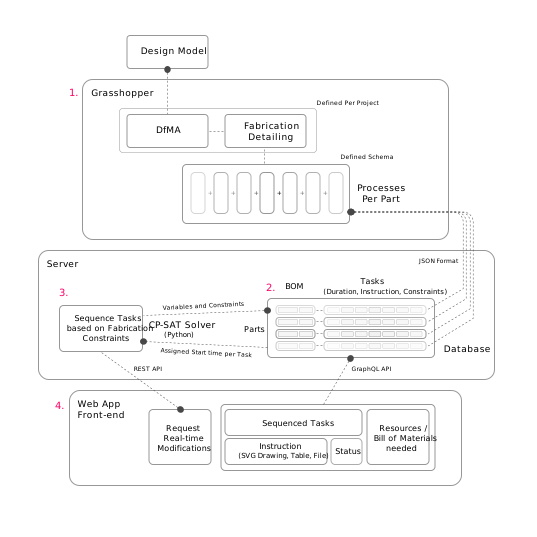
There are 4 main elements to the software components:
- Grasshopper3d: This would be the starting point for the information coming from design model and detail modeling of the project.
- Backend - Database: We use Firebase as our database for the application.
- Backend - Scheduling: We use a separate server for scheduling purposes.
- Frontend: A VueJS app designed for desktop and tablet interfaces.